
Table of Contents
Kubernetes has become the standard platform for running containerized applications across cloud and on-premises environments. It automates the deployment, scaling, and management of containers, but its flexibility comes at a cost. Every application needs a set of YAML manifests, and keeping those manifests consistent across development, staging, and production quickly becomes a challenge for operations teams.
A number of open-source tools have emerged to make this easier. Two of the most widely used are Kustomize and Helm.
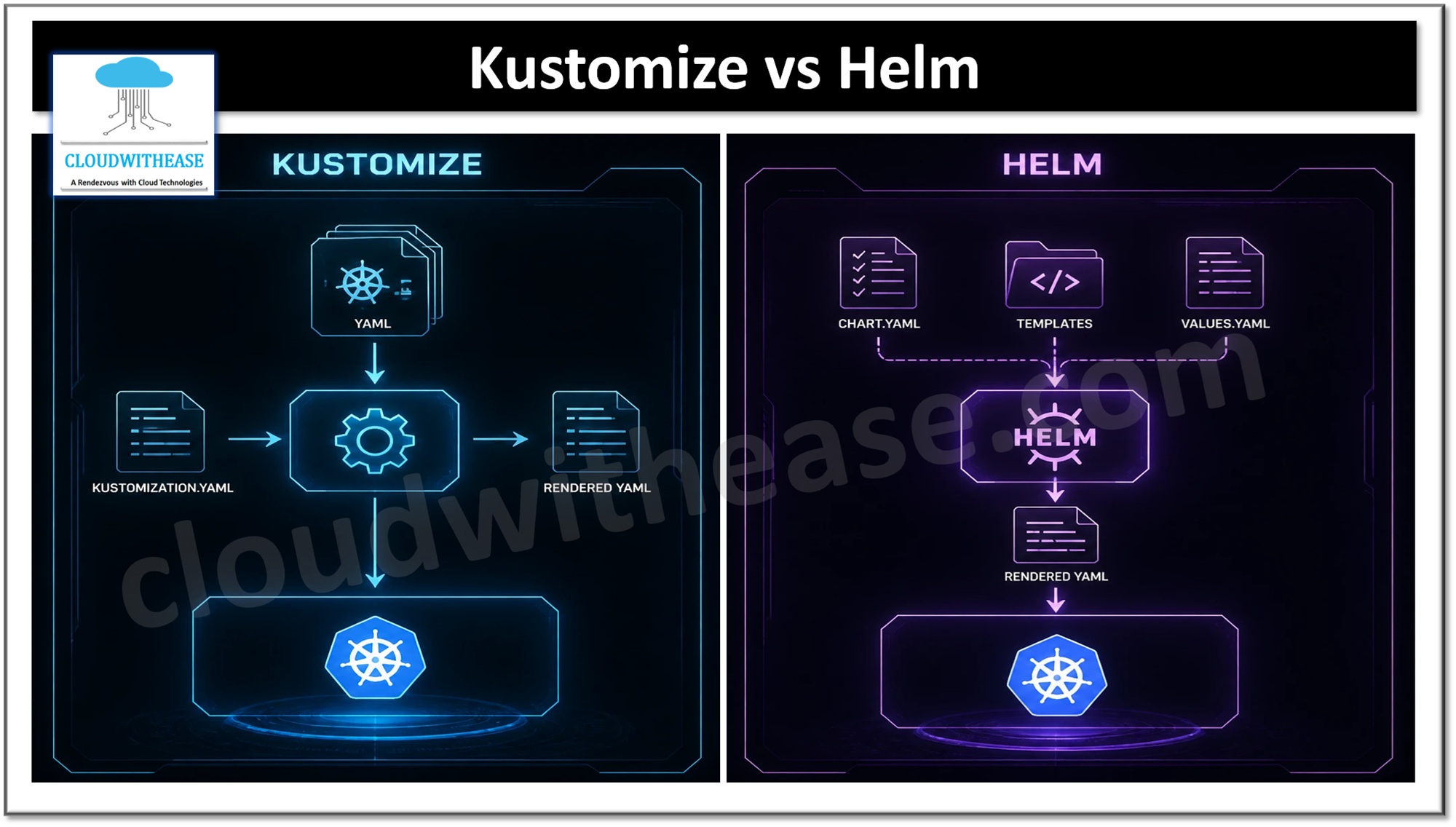
Kustomize is a declarative, template-free configuration management tool that is built into kubectl. You keep a common base configuration and apply environment-specific overlays on top of it, so every environment can be customized without duplicating manifests or learning a templating language.
Helm takes a different approach. It is a package manager for Kubernetes that bundles applications into versioned charts built from Go templates and configurable values. Beyond configuration, it also handles dependencies, release tracking, and rollbacks.
In this article, we will look at the differences between Kustomize and Helm, along with their use cases, advantages, and limitations.
What is Kustomize
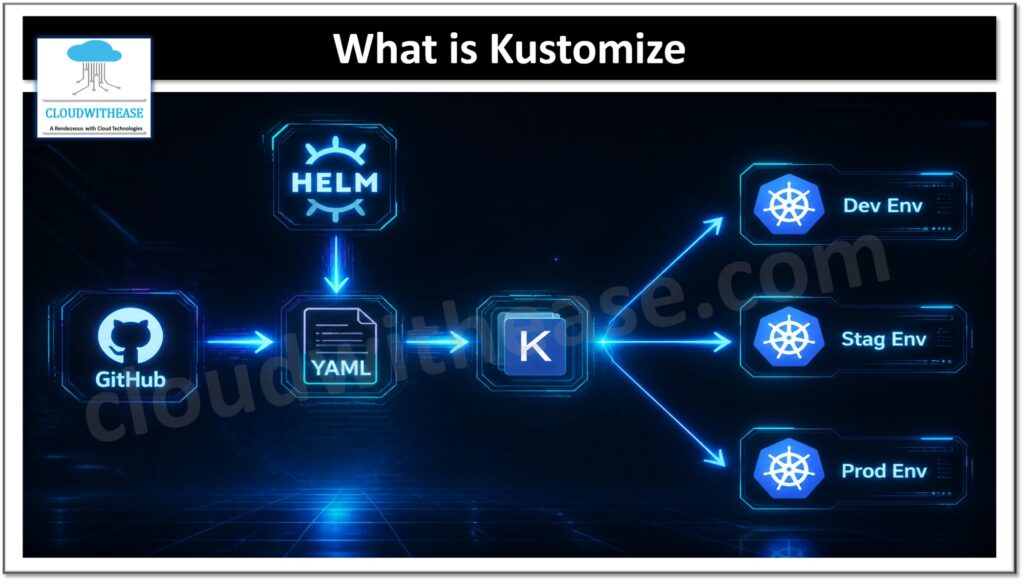
Kustomize is a template-free configuration tool that works natively with Kubernetes and is built into kubectl (kubectl apply -k). Instead of using placeholders or a templating language, it works directly on plain Kubernetes YAML manifests. You keep a common, reusable configuration as a base, and then create overlays that patch or extend that base for specific environments such as dev, staging, or production. Everything is driven by a kustomization.yaml file, which lists the resources that make up the base and defines the changes, such as patches, name prefixes, labels, and image tags, that each overlay applies on top of it.
Why consider Kustomize?
- ConfigMap and Secret generation: Kustomize can generate ConfigMaps and Secrets directly from files or literal values, and it appends a content hash to their names. A change to the configuration therefore triggers a rolling update of the workloads that use it.
- Patching existing resources: You can modify resources without editing the original manifests, using strategic merge patches or JSON patches to change only the fields you need.
- Environment-specific configuration: Each environment gets its own settings, such as replica counts, image tags, namespaces, and labels, without duplicating the full set of manifests.
- Base and overlay structure: A shared base holds the common configuration, and overlays layer environment-specific changes on top of it. This keeps manifests DRY and makes the differences between environments easy to see.
Advantages of Kustomize
- No templating: It works with plain Kubernetes YAML, so manifests stay readable and valid at every stage.
- Built into kubectl: You can apply configurations with kubectl apply -k without installing anything extra.
- Easy environment management: The base and overlay model keeps shared configuration in one place and isolates the differences for each environment.
- GitOps friendly: It works natively with Argo CD and Flux, and every change is a reviewable diff in Git.
- Gentle learning curve: Teams already familiar with Kubernetes manifests can start using it quickly.
Limitations of Kustomize
- No packaging or distribution: There is no chart-like format or central repository for sharing applications.
- No release management: It has no built-in release history, rollback, or lifecycle hooks.
- No dependency handling: Applications made up of several components have to be assembled manually.
- Verbose for large changes: Many overlays and patches can become hard to follow as variations grow.
What is Helm?
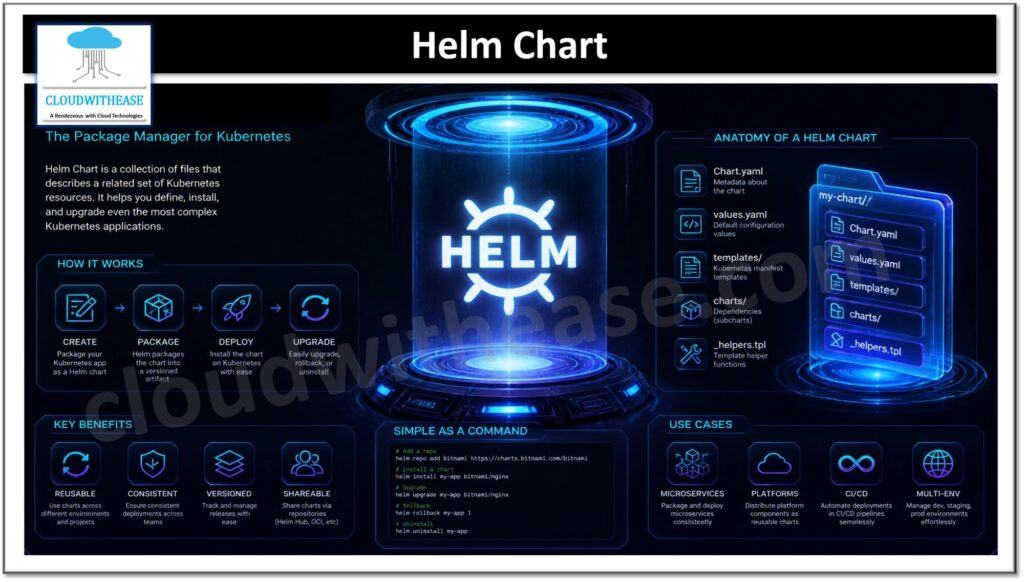
Helm is the package manager for Kubernetes. It packages applications as charts, which are collections of YAML templates that describe everything an application needs to run in a cluster, including Deployments, Services, Ingress rules, and ConfigMaps. Helm also manages versioning, dependencies between charts, and complex configuration, so an entire application can be installed or upgraded with a single command. Many popular applications are available as community-maintained charts that are widely used in production, which gives teams a tested starting point instead of writing manifests from scratch.
Chart templates are written in Go template syntax. Default settings live in a values.yaml file, and Helm renders the final Kubernetes manifests by combining the templates with those values. You can override any value at install time, so one chart can serve dev, staging, and production without being rewritten for each. Each chart also has its own version number, which lets you keep several versions of the same application’s configuration and move between them when needed.
Why consider Helm?
- Packaging complex applications: Microservice-based applications often span dozens of Kubernetes objects. Helm bundles all of them into a single chart, so you can install, upgrade, or remove the whole application with one command.
- Repeatable, automated deployments: Charts are versioned and parameterized through values.yaml. The same chart can be deployed across environments by changing only the values, and it fits easily into CI/CD pipelines.
- Safer releases with less manual work: Helm tracks every release, so a failed upgrade can be rolled back with helm rollback. Teams stop hand-editing manifests in production, and the risk of configuration drift goes down.
- A good fit for AI infrastructure: AI platforms rely on many interdependent components, such as GPU operators, model-serving frameworks, vector databases, and monitoring stacks. Most of these ship as Helm charts, which makes Helm a practical way to deploy them consistently across clusters.
Advantages of Helm
- Complete application packaging: A single chart bundles every resource an application needs, versioned and ready to share.
- Large ecosystem: Thousands of community and vendor charts are available on Artifact Hub for common software.
- Release management: Helm tracks every release and supports upgrades and one-command rollbacks.
- Dependency management: Charts can declare and pull in other charts as dependencies.
- Flexible configuration: Values files and template logic let one chart serve many environments and use cases.
Limitations of Helm
- Template complexity: Go templates with heavy conditional logic can be difficult to read, debug, and maintain.
- Steeper learning curve: Teams need to learn chart structure and template syntax on top of Kubernetes itself.
- Less transparency: The deployed manifests are generated at render time, so it is harder to see exactly what reaches the cluster.
- Limited by chart authors: If a chart does not expose a setting through its values, you may have to fork the chart or post-process its output, often with Kustomize.
Comparison table: Kustomize vs Helm
| Parameter | Kustomize | Helm |
|---|---|---|
| Approach | Template-free; patches and overlays applied to plain YAML | Template-based; Go templates rendered with values |
| Primary purpose | Customizing Kubernetes manifests for different environments | Packaging, distributing, and managing Kubernetes applications |
| Configuration model | Base plus overlays | Chart templates plus values.yaml |
| Key file | kustomization.yaml | Chart.yaml and values.yaml |
| Installation | Built into kubectl (kubectl apply -k); also available as a standalone binary | Separate CLI that must be installed |
| Learning curve | Lower; works with standard Kubernetes YAML | Higher; requires Go template syntax and chart structure |
| Packaging and distribution | No packaging format; usually shared through Git repositories | Charts are packaged, versioned, and shared through chart repositories and OCI registries |
| Release management | None; no record of what was deployed | Tracks each release with revision history |
| Rollback | Manual, usually by reapplying a previous Git commit | Built in with helm rollback |
| Dependency management | Not supported natively | Supported through chart dependencies in Chart.yaml |
| Lifecycle hooks | Not supported | Pre- and post-install, upgrade, and delete hooks |
| Readability of output | High; the final manifests closely match the source YAML | Lower; heavy templating can make charts hard to read and debug |
| Ecosystem | Smaller; no central catalog | Large; thousands of public charts on Artifact Hub |
| GitOps compatibility | Strong; natively supported by Argo CD and Flux | Strong; also supported by Argo CD and Flux |
| Best suited for | In-house applications needing clean, environment-specific variations | Third-party or complex applications needing packaging, versioning, and lifecycle control |
Download the comparison table: kustomize vs helm
Which one to choose?
Kustomize is the simpler option when you own the manifests and only need to vary them across environments. It adds no templating layer, and the output stays close to standard Kubernetes YAML. Helm is the better fit when you need to package and share an application, manage dependencies, or rely on release history and rollbacks.
The two tools are not mutually exclusive. A common pattern is to install a third-party application from a Helm chart and use Kustomize to apply organization-specific patches on top. Kustomize supports this through its helmCharts field, and Argo CD supports it as well.