
Table of Contents
As cloud computing has taken over in the past couple of years many new terminologies have emerged such as Virtual Machine Scale Sets (VMSS), containers, pods, nodes etc.
Kubernetes containers are the latest technology in cloud computing which is a lightweight bundle of all executable software packages including its dependencies such as code, runtime, system tools, libraries, and settings. It enables a consistent and isolated environment for applications to run without worrying about the underlying infrastructure.
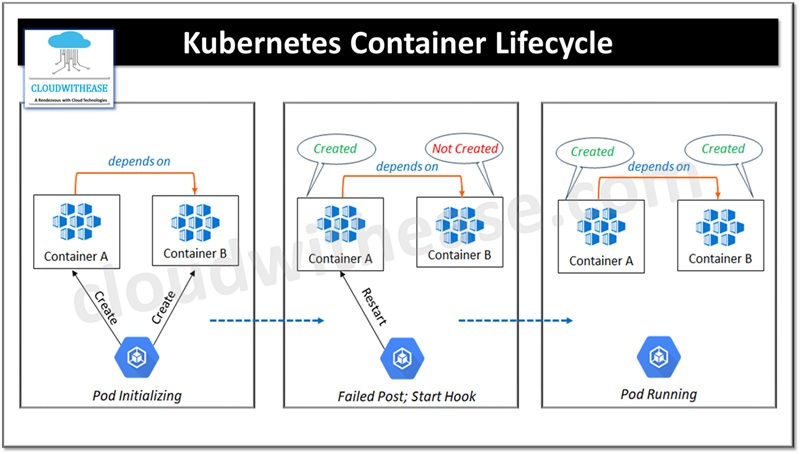
Kubernetes container lifecycle has events and hooks which are essential to manage behavior and state of applications running on a kubernetes cluster. They help in debugging, providing automated responses, resource management, graceful shutdowns, application specific logic for kubernetes clusters.
In this article we will learn more in detail about Kubernetes Container Lifecycle Events and Hooks, their characteristics, why we need them and how they function.
Understanding Kubernetes Container Lifecycle Events and Hooks
The smallest unit in the kubernetes cluster is Pod. Kubernetes container packages all resources and dependencies required to run an application hence it is important for them to track all stages of container states. Pods are used to represent the lifecycle of kubernetes and how it manages the code.
Kubernetes Pod Lifecycle
Pods record state of its status when we run kubectl get pods command it tells current phase of pod lifecycle such as:
- Pending – kubernetes API accepted the pod but containers are yet to be created
- Running – pod is scheduled on a node. Kubernetes API accepted the container and application will execute as expected
- Succeeded – means container process for pod is successfully started and terminated
- Failed – means pod has terminated but one returned with zero status (failed)
- Unknown – means pod has problem in connecting to node and kubernetes can’t determine pod state
- CrashLoopBackoff – means kubernetes tried restarting the pod but container is failed to start
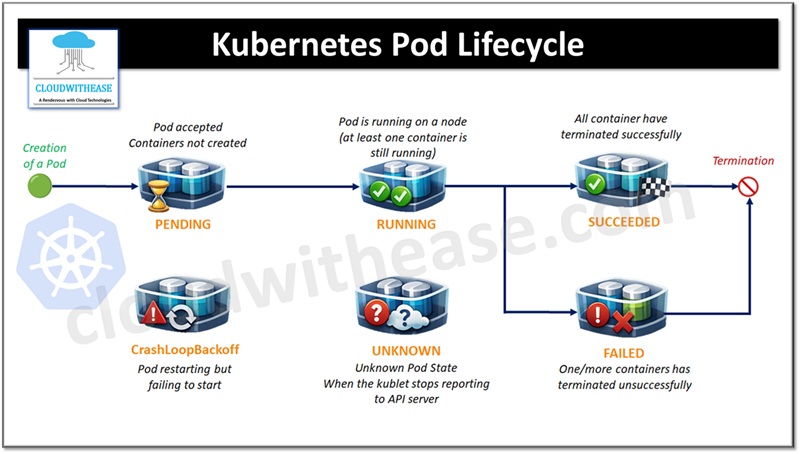
Events trigger hooks eventually which allows reaction to those events and allows to run some custom code.
Kubernetes Container Lifecycle
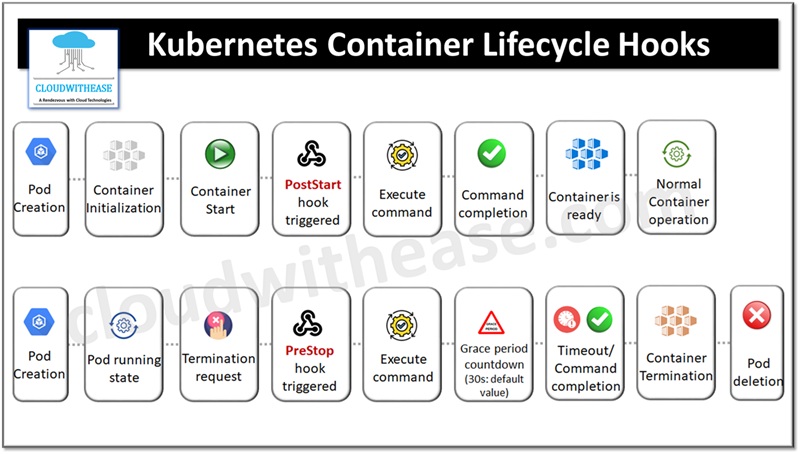
The container hooks respond to container lifecycle events in kubernetes clusters For example, you want to run a command before kubernetes terminate a pod and release resources back to initiate graceful shutdown. This can be achieved by using the two hooks used by kubernetes cluster are:
PostStart
It is executed post container creation. The hook might get invoked after the execution of CONTAINER ENTRYPOINT. The hook handler should not accept any parameters.
PreStop
It is executed immediately after the container is terminated due to several reasons such as insufficient resources, liveness probe failure etc. no parameters shall be passed to handler and container will be terminated irrespective of handler outcome.
Types of Handles
Two types of handles can be attached to the event hook.
- Exec: In the container main process a specific command is executed. The command is executed along with CONTAINER ENTRYPOINT. If the hook is taking too long to execute or a failed kubelet process will restart.
- httpGet or tcpSocket: against a specific container endpoint an HTTP request is sent or TCP socket connection is established. Kubelet process directly executes the Http or TCP socket handler.
Usual behavior of hook is to execute once and HTTP handlers delivery request is made once by Kubelet process unless kubelet is restated during the process.
Example Showing Usage of Lifecycle Events and Hooks
Let us create a hook in this example to understand how they work. The hooks will apply only to the container in which they are created.
Apiversion: v1
Kind: pod
Metadata:
Name – my-pod
Spec:
Containers:
Name: mycontainer
Image: nginx
# lifecycle hook spec
Lifecycle:
Poststart:

# Your EXEC handler
Exec:
command: ["/bin/sh", "-c", "date", "echo postStart hook executed > /my.log"]
Run kubelet command and deploy the container
kubectl exec --stdin --tty my-pod -- shNow read contents logged into my.log file
# cat /my.log

PostStart hook executed
No errors in execution means the container will be created successfully here.
Kubelet will not execute PostStart after container creation. If the exec command is successful no further execution of any commands will happen by Kubelet post container creation.
In PreStop hook command is executed before termination of container. Lets look at the configuration example to understand how it works.
Apiversion: v1
Kind: pod
Metadata:
Name: my-pod
Spec:
Containers:
Name : my-container
Image: myC
Ports:
containerPort: 6439
volumeMounts:
name: my-data
moutpath: /old/ver/data
lifecycle:
PreStop:
Exec:
Command: [“my-cli shutdown”]
Volumes:
Name: my-data
emptyDir: {}
Check logs on my-container
kubectl logs -f my-pod -c my-containerUse below command to watch trying to delete my-pod on terminal
kubectl delete pod/my-podWhen you delete a pod object. PreStop hook gets executed before pod termination. TERM signed is sent by Kubernetes to the main process of Pod signalling graceful shutdown of containers and termination of child processes.